


Mail.ru
Hot Novels






Install Tips
Mobile safety & integrity report for the latest package. We provide verifiable checksums and a timestamped scan summary. Latest package Mail.ru 15.58.0.124204(124204) scanned by multiple engines; no threats detectedas of Tue, 28 Jul 2026 11:25:34 GMT.
After downloading, use a system or third-party checksum tool to calculate the SHA256 and ensure it matches the value provided on this page (case-sensitive, without spaces).
Each engine uses different signature databases and heuristics, so results may vary slightly. We provide a timestamp and checksum to allow you to independently verify the package.
Mail.ru Review
Mail is now more than just an email client. Mail is a set of services for a productive life and work. For you in a single application: fast Mail service, a convenient Calendar, Notes, Cloud for photos, Documents, Shopping, News.
Add accounts from other email clients to your mail: Yandex.Mail, Microsoft Outlook, Gmail from Google, Hotmail, Rambler, Yahoo - and switch between them with one click.
Brief summaries of long letters. Let the neural network in the Mail app read all your long emails and give you a quick summary of the context so you don't waste time.
The best dates for holidays in the Calendar app. The calendar will tell you which month is best to take a vacation and which days are best to include in it. Select the "Year" tab and enter your salary.
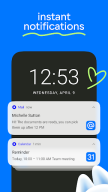
Manage new email notifications. Customize only the push notifications and messages you need in the Mail app: select the folders you care about and comfortable times to receive the notifications.
Accounts of all mail clients in one application. Collect all your emails in one application - read incoming emails that come to you via Microsoft Outlook, Yahoo, Gmail from Google, Yandex.Mail, Hotmail, Rambler, and Zimbra in one click.
Only the services you need in the Mail app. A fast email app with a neural network, a useful Calendar, which will remind you of meetings and plans and to calculate vacation for you, Notes, Weather, News, Cloud for storing photos, documents and scans.
Bring order to your newsletters. Newsletters with app updates, news about services, and offers from stores are collected on one page - unsubscribe from any that are irrelevant and keep the ones are relevant.
Translations into other languages. We have added a convenient email translator. Useful if you read foreign newsletters or send business mails abroad. Just open the email or write the text and select the language - a translation will appear instantly.
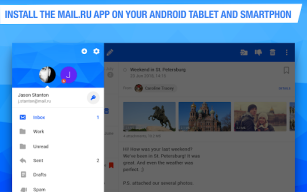
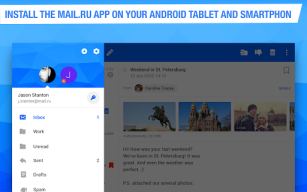
Grouping letters by subject and address. The email client collects all emails into threads, and also automatically sorts newsletters, news, notifications from social networks, and personal emails into folders.
A planner for your affairs. Work meetings, reminders of important dates, checklists, calls. A link to call is just one click away when you add a meeting to your work calendar.
The cloud is a safe place for documents and photos. The Cloud service will save files from emails and find scans of documents. Upload all your photos and videos to the cloud to free up your smartphone memory.
Use the dark background in the Mail application to make it easier on your eyes. Choose a bright interface for Mail and Cloud to work with during the day, and use a dark interface at night.
Contacts from your address book and email clients in your application. Choose who to send a letter to and the Mail app will suggest contacts from your address book and all accounts in your emails.
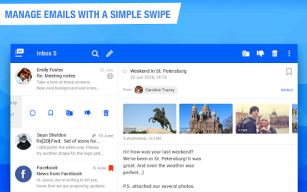
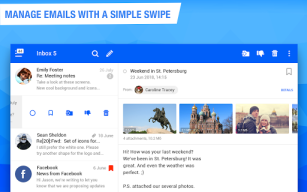
Quick actions with emails. Manage your emails in the app and in your browser: Mark a new email as important, move it to a new folder, delete it, or leave it unread. Add other email client accounts to the Mail app: Rambler, Gmail from Google, Yandex.Mail, Microsoft Outlook, Hotmail, Yahoo.
A convenient offline mode for reading emails. The application will save your mails in the smartphone’s local storage so that you can read them without access to a network, such as when on a plane or in remote parts of nature.
WRITE TO US
We love to hear from you. Tell us what you think of the Mail app. Use the "Write to the developer" section or write a letter to mailapps@corp.mail.ru.
A COUPLE MORE LINES
Mail is a reliable email client and application that comes with all the services you need for work. The application is compatible with Android versions 7.0 and higher. Suitable for working with Mail, Yandex.Mail, Rambler, Gmail from Google, Yahoo, Hotmail, Microsoft Outlook and other services that support the IMAP, POP, and SMTP protocols.
Changelog
In the new version of the app everything is as it should be: emails are sent and translated... Yes, an email can be translated. Open it, find the three dots, and then “Translate message”. Be sure to try it out.
Additional information
Screenshots







Reviews
Recommend Article











Similar Apps

BT Email app for our new service users!

Caller ID & spam call blocker. Always know who calls!🇺🇸

Carrier Services enables the latest communication services from mobile carriers.

Global call- Secure,simple,stable chat app & SMS messaging app

All Languages Fast Voice Translator & Speak to Translate in English & Dictionary

Fast internet with AI, Adblock & VPN. Browse on a safe, incognito web browser.