


Switch Access
Hot Novels






Install Tips
Mobile safety & integrity report for the latest package. We provide verifiable checksums and a timestamped scan summary. Latest package Switch Access 1.16.1.798952610(753) scanned by multiple engines; no threats detectedas of Tue, 28 Jul 2026 11:32:49 GMT.
After downloading, use a system or third-party checksum tool to calculate the SHA256 and ensure it matches the value provided on this page (case-sensitive, without spaces).
Each engine uses different signature databases and heuristics, so results may vary slightly. We provide a timestamp and checksum to allow you to independently verify the package.
Switch Access Review
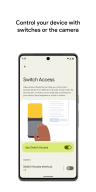
Control your device with switches or the front camera.
Control your phone or tablet using switches or the front camera. You can use switches to select items, scroll, enter text, and more.
Switch Access helps you interact with your Android device using one or more switches instead of the touchscreen. Switch Access can be helpful if you can't interact directly with your device.
To get started:
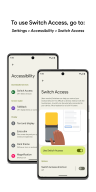
1. Open your device's Settings app.
2. Tap Accessibility > Switch Access.
Set up a switch
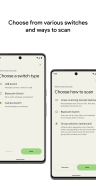
Switch Access scans the items on your screen and highlights each item until you make a selection. You can choose from a few kinds of switches:
Physical switches
• USB or Bluetooth switches, like buttons or keyboards
• On-device switches, like volume buttons
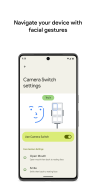
Camera switches
• Open your mouth, smile, or raise your eyebrows
• Look left, right, or up
Scan your device
After setting up a switch, you can scan and interact with things on the screen.
• Linear scanning: Move between items one at a time.
• Row-column scanning: Scan one row at a time. After a row is selected, move through items in that list.
• Point scanning: Use moving lines to select a specific horizontal and vertical location, then press "Select".
• Group selection: Assign switches to different color groupings. All items on the screen will be assigned a color. Press the switch corresponding to the color around the item you want. Narrow down the size of the group until you reach your choice.
Use the menus
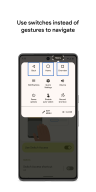
When an element is selected, you'll see a menu with available interactions, like select, scroll, copy, paste, and more.
There will also be a menu at the top of the screen to help you move around your device. For example, you can open notifications, go to the home screen, change the volume, and more.
Navigate with Camera Switches
You can use Camera Switches to navigate your phone with facial gestures. Browse or select apps on your phone with the use of your phone’s front camera.
You can also customize the sensitivity and duration of each gesture to better fit your needs.
Record shortcuts
You can record touch gestures that can be assigned to a switch or started from a menu. Touch gestures can include pinching, zooming, scrolling, swiping, double tapping, and more. You can then start frequent or complex actions with a single switch, for example, recording a gesture that swipes left twice to turn two pages of an ebook.
Permissions Notice
• Accessibility Service: Because this app is an accessibility service, it can observe your actions, retrieve window content, and observe text that you type.
Changelog
Jun 5, 2025
Control your device with switches or the front camera. Download the latest version of Switch Access 1.16.0.747675253 to enjoy new features and updates immediately!
This update includes bug fixes.
Additional information
Screenshots
Reviews
Recommend Article











Similar Apps

CPU-Z is an application that reports information about your Android device.

A simple and concise game downloader

DVS checks compliance status of IMEI based devices

VPN gives you Privacy and Freedom you deserve. Now with Premium VPN Subscription

Secure VPN for unlimited browsing with simple, fast connections.

Unlimited VPN master to unblock sites, WiFi hotspot security, protect privacy