

Utiful: Move & Organize Photos
Hot Novels






Install Tips
Utiful: Move & Organize Photos Review
Utiful is the photo filing system that Google forgot to build in Android.
Frustrated that Google Photos mixes everything—and won't let you create real order?
The Google Photos app won’t let you truly organize your pictures. You create an album, add photos—and they still stay in the camera roll. You delete them from the camera roll, and they disappear from the album too.
That’s why we built Utiful.
Unlike Google Photos and other gallery apps, Utiful lets you:
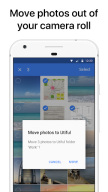
• Move photos out of your camera roll and away from the Android Gallery—finally!
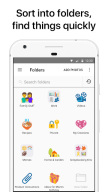
• Sort your photos into separate categories—work, hobbies, personal, and more.
• Keep utility photos like documents, receipts, and IDs out of your main gallery.
• Keep your main gallery clean and tidy.
How Utiful Works:
• Use Utiful to move photos out of your camera roll and save them to Utiful folders.
• The photos are removed from the camera roll but kept in your Utiful folders.
Utiful’s further unique features include:
• Save photos to Utiful folders straight from the Photos app and from the Gallery app.
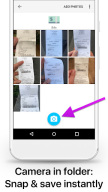
• Take photos with the folder camera that save directly to the folder.
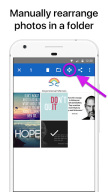
• Manually rearrange photos in a folder—just the way you like.
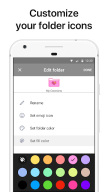
• Customize the icons of your photo folders with emoji symbols and colors.
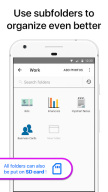
• Keep your Utiful folders on internal storage or SD card.
• Protect your Utiful folders with a passcode lock or fingerprint.
• Import/export photo folders from/to your computer.
Who Uses Utiful:
• Professionals & freelancers keeping work photos separate from personal ones
• Contractors & service providers managing before/after project pictures
• Doctors & lawyers organizing reference photos, evidence, and case documentation
• Hobbyists & creatives storing inspiration, artwork, and craft ideas
• Everyday users organizing screenshots, receipts, IDs, and notes by category as well as reference pictures such as haircuts, clothes, fitness tracking, songs identified with Shazam etc.
Quick Start Guide:
1. Open Utiful, tap "Add Photos", select photos from the camera roll and tap "Move".
2. Or, while in the Photos app or in the Gallery app, select photos, tap Share and choose Utiful.
• No Internet required: You can keep organizing your photos offline without any problems.
• No lock-in: Everything you move to your Utiful folders remains on your device even if you delete the app.
• No ads: Enjoy undistracted productivity when organizing your photos.
All photo, video, GIF, and RAW formats are supported. Original image quality & metadata are preserved.
The full feature list and User’s Manual are available anytime in the app’s settings.
Download Utiful today and take control of your photo library!
Terms of Use: utifulapp.com/terms.html
Privacy Policy: utifulapp.com/privacy.html
Additional information
Screenshots
Reviews
Recommend Article









Similar Apps

Live Photo & moving face animator, make pixa loop with motion portrait to video.

Create beautiful collages with fresh photo layouts and templates!

Powerful gallery on android. Beautiful design and convenient control!

Photo Editor & Collage Maker: Blend Photo, Scrapbook, Background Changer & More.

Transform photos into videos! Create realistic or anime-style images easily!
Self-Discovery, meet yourself through selfies, photo editing & quizzes!