


PhotoScan by Google Photos
Hot Novels






Install Tips
Mobile safety & integrity report for the latest package. We provide verifiable checksums and a timestamped scan summary. Latest package PhotoScan by Google Photos 1.7.1.539739820(156012) scanned by multiple engines; no threats detectedas of Tue, 28 Jul 2026 11:28:51 GMT.
After downloading, use a system or third-party checksum tool to calculate the SHA256 and ensure it matches the value provided on this page (case-sensitive, without spaces).
Each engine uses different signature databases and heuristics, so results may vary slightly. We provide a timestamp and checksum to allow you to independently verify the package.
PhotoScan by Google Photos Review
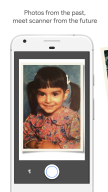
PhotoScan is a scanner app from Google Photos that lets you scan and save your favorite printed photos using your phone’s camera.
Picture perfect and glare free
Don’t just take a picture of a picture. Create enhanced digital scans, wherever your photos are.
– Get glare-free scans with an easy step-by-step capture flow
– Automatic cropping based on edge detection
– Straight, rectangular scans with perspective correction
– Smart rotation, so your photos stay right-side-up no matter which way you scan them
Scan in seconds
Capture your favorite printed photos quickly and easily, so you can spend less time editing and more time looking at your bad childhood haircut.
Safe and searchable with Google Photos
Back up your scans with the Google Photos app to keep them safe, searchable, and organized. Bring your scans to life with movies, filters, and advanced editing controls. And share them with anyone, just by sending a link.
Changelog
Сохранение при съемке
Отсканированные фото сохраняются на устройстве в момент съемки.
Улучшенный редактор углов
Вы можете внести дополнительные изменения в отсканированное фото после автоматического кадрирования, перетаскивая края и углы изображения.
Additional information
Screenshots



Reviews
Recommend Article









Similar Apps
![[명품사진 1장 10원] 찍스 – 사진인화 icon](https://img.apkdock.com/image/app_icon/ticks-photo-printing_icon.webp?imageMogr2/thumbnail/56x56)
Highest price photo paper, high quality 4X6 photo for 10 won! + [NEW] Photo calendar launched!

Create AI Effects for your photos

Live Photo & moving face animator, make pixa loop with motion portrait to video.

Android Native system HD camera app. Never been so simple and faster.

Camera app for Pixel

Effortlessly make high-quality GIFs from images & videos without any watermarks.